
Free Ways to Add Custom Shortcut Buttons on Mac
The menu command is one you already use, the files sit in a folder you open every day, and the phone is on the desk.
One shortcut, then a place to tap it
You paste the same Zoom link into five chats a day, and each time you dig it out of an old message. Put the link into one shortcut, because a Mac shortcut can move text between apps or open a page. One shortcut per job is enough, so the click does the pasting for you.
On recent macOS versions, File > Add to Dock leaves an icon in the Dock until you click it. Add Keyboard Shortcut takes a combination that runs in any app, unless macOS has reserved those keys. After you set it to run while you work, use the icon for a readable name or the key when you are already typing.
The catch is the selection. A Dock icon cannot see text or a file you had highlighted, and a menu bar shortcut has the same limit. Turn on Use as Quick Action and allow it under Privacy & Security, then Extensions, then Finder. Control-click the Finder item and choose the shortcut under Quick Actions.
On macOS 26, Control Center can hold Run Shortcut or Open App, and Show Menu Bar Collection puts that set in the Shortcuts menu. You add one from Edit Controls in Control Center, where you pick Shortcuts, add the control, and click Done. If the job needs the text you had selected, run the shortcut from Spotlight, which can take that selection where the Dock icon cannot.
If you would rather type a short string than click, Text Replacements under Keyboard expand it into the saved phrase in apps that support them. The Dock icon is the better click when you want that Zoom link without typing a trigger.
A key, when you are already typing
You are mid-sentence in a document, and the command you want is already sitting in the menu. App Shortcuts live under System Settings, then Keyboard, then Keyboard Shortcuts, where you add a row for one app or for All Applications. Type the menu title exactly as it appears, using three periods if it ends in an ellipsis, then press the keys and click Done.
This only binds a command that already exists in a menu, so it will not open an app or a URL. If those keys already belong to another command, the new shortcut does nothing until you change one of them. Use the key for a command you know by feel, and the Dock when you want a readable name or several steps.
The shortcut's own key combination can run while another app is in front. An App Shortcut cannot, because it belongs to the app whose menu you named.
Dock folders, files, and one site
You drag apps to the left of the separator and files or folders to the right to open them from the Dock. It keeps an alias, so removing the icon does not delete the original. That Dock row is already there, and a folder in it opens as a stack of the documents you use together.
Control-click a folder in the Dock to sort it, or to show a fan, a grid, or a list. Click the item and it opens, but a crowded folder gets clumsy fast, so keep the stack to the files you actually use together.
On macOS Sonoma 14 or later, a site you open every morning can be its own Dock icon. Safari's File menu has Add to Dock, and a Safari web app then opens that page outside your normal tabs.
Focus and sound can sit in the menu bar with the other settings you flip often. Add them from System Settings, or drag them out of Control Center during Edit Controls, when you change the menu bar. That icon changes a setting, rather than running a shortcut you built.
Free apps that are not a grid
Snippets, quicklinks, and clipboard history are included on Raycast's free plan, and AI stays on the paid plans. You open Raycast by typing, so it fits a snippet or a link better than a button you want to see.
Hammerspoon is free and open source, and it does nothing until you write a Lua file that connects an event to an action. Use it when you want behavior macOS will not build for you, and skip it when a labeled button is all you need.
A phone or tablet you already own
Six keys stay free, with no trial, when you pair Stream Deck Mobile on an iPhone, iPad, or Android device with a Mac or PC. The paid upgrade raises the cap to as many as 64 keys. For the free limits on the other phone apps, read which iPhone apps stay free. If the spare device is a tablet, an iPad beside the Mac is the closer fit.
DeckPilot
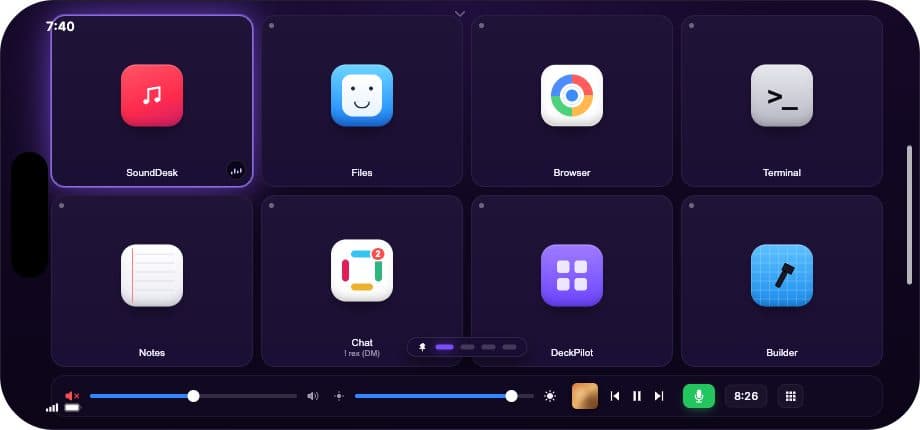
DeckPilot, the app we make, puts a grid on an iPhone or iPad and sends the tap to the Mac. Opening an app or sending a keyboard shortcut is the kind of button that belongs on that grid. You can download DeckPilot and try it on your own setup.
When a pad is still the right buy
A hardware pad is worth buying when you need a key you can press without looking, or a dial for the work on screen. A Dock icon and a phone grid both ask you to look. Try the Dock for a week, then use the alternatives roundup if you still miss the click.
How the free routes compare
| Route | What it is good at | What gets awkward | Setup |
|---|---|---|---|
| Shortcut in the Dock, or a key | Several steps, with a label or a keystroke | The Dock icon cannot see selected text | A few clicks in Shortcuts |
| Control Center on macOS 26 | Run Shortcut or Open App from the menu bar | Documented as a macOS 26 control | Edit Controls, then Shortcuts |
| App Shortcuts | A menu command you already know by feel | Cannot open an app or a URL | One row in Keyboard Shortcuts |
| Dock folder, or a Safari web app | Opening files, apps, or one site | A sequence, rather than one launch | A drag, or Add to Dock in Safari |
| Raycast free | Snippets and links from the keyboard | You wanted visible buttons | Install it, then type |
| Phone or tablet you own | Labels on a device you already have | No key you can hit without looking | Install an app and pair it |
Questions that come up
Where do I click a shortcut I already made?
File > Add to Dock puts the icon in the Dock, and Add Keyboard Shortcut gives it a key that runs in any app. On macOS 26, Control Center can also hold Run Shortcut next to your other controls. If the shortcut needs the text you selected, use a Quick Action instead of the Dock icon.
Why does my App Shortcut do nothing?
The menu title has to match the menu exactly, including an ellipsis typed as three periods, and the keys cannot already belong to another command. This setting also cannot open an app, because it only binds a command that already exists in a menu.
Can the phone I already own be the grid?
Stream Deck Mobile keeps six keys free when you pair it with a computer, and a paid upgrade raises the cap. DeckPilot does the same kind of job from an iPhone or iPad you already have. Install it and see whether that grid fits the shortcuts you already use.
When is a hardware pad worth buying?
Buy one when you need a key you can press without looking, or a dial you turn while you watch the screen. A Dock icon and a phone grid both need you to look, so they are the better fit until that starts to fail.