
Can You Use Sidecar as a Stream Deck on a Mac?
An iPad on Sidecar can show a sidebar and a Touch Bar, and iPhone Mirroring keeps the phone in a window on the Mac. Here is when those built-ins are enough, and when a button app or a hardware pad is the better tool.
What the iPad actually shows
You have the iPad on the desk, and you want something to tap while the Mac stays in front of you. Sidecar extends the Mac desktop onto that iPad, or it mirrors the Mac when you pick the iPad under Screen Mirroring. A window moves across by a drag, or from the green full-screen button.
What looks like a button pad is the sidebar, and it can show or hide the menu bar in full screen and the Dock. Command, Option, Control, and Shift sit in that column, where you touch and hold one to press it or double-tap to lock it. You then click or draw the way you would with that key held on a keyboard. Undo, the onscreen keyboard, a return to the Home Screen, and disconnect fill out the rest of the column.
In Displays settings you can move the sidebar to either edge, and you can show the Touch Bar on the top or the bottom. The strip shows whatever the frontmost Mac app puts there, so it fits when that app still has controls you use. It also fits when you are drawing with Apple Pencil and you only need Shift or Command for a moment. Turning the strip on is covered in the Touch Bar replacement guide.
There is nowhere to add a button of your own, and a tap on that sidebar cannot run a Shortcut, a script, or a URL. While the session is up, the iPad is a Mac display, so opening another iPad app suspends Sidecar until you switch back. Starting with iPadOS 27 and macOS 27, touch reaches Mac windows and menus, and earlier systems stay with two-finger scroll, cut, copy, paste, and undo. That touch operates the Mac desktop, so buttons you name still have to come from an app.
Sidecar needs macOS Catalina 10.15 or later and iPadOS 13 or later, with both devices on the same Apple Account and two-factor authentication. Wireless and USB conditions, and the model list, are on Apple's Sidecar page and in the spare iPad guide, which also covers Universal Control. With Universal Control the Mac pointer moves onto the iPad, the iPad keeps its own apps, and you still do not get buttons you designed.
A phone window, pointed at the iPhone
When the spare device is an iPhone, the built-in to try next is iPhone Mirroring. It puts the iPhone in a window on the Mac, and you click and type there while the phone stays locked. Notifications from the iPhone can appear on the Mac, which helps when the phone is across the desk.
The catch is the direction. The Mac is controlling the iPhone, so the phone never becomes a surface that fires actions on the Mac. Mirroring also stays off while the Mac is using Sidecar or AirPlay, and it is unavailable in the European Union.
You mirror one iPhone from one Mac, which needs macOS Sequoia 15 or later and Apple silicon or the Apple T2 Security Chip. The iPhone needs iOS 18 or later with a passcode and the same Apple Account, and it has to stay nearby and locked, so it cannot double as a button deck at the same moment.
When a button app is the better fit
You are on a call and mute is the control you keep missing, or you open the same app all morning and fumble the shortcut. You want a label you chose, with a tap that runs on the Mac. The sidebar, the Touch Bar, and the iPhone window cannot store that button, so a phone or tablet app holds it and sends the tap to the Mac.
Stream Deck Mobile shows Elgato's keys on an iPhone, iPad, or Android device, and six of them stay free. The paid set goes up to 64 keys, and one key can run several actions in one press. The phone needs the desktop app on the same Wi-Fi, running iOS 15 or later and Stream Deck 6.3 or later, and that app needs macOS Ventura 13 or later.
Touch Portal covers Windows, Mac, and Linux, and it runs on macOS 10.13.6 or later with iOS 12 or later. The buttons sit on a phone or tablet, where one button can run several actions, including speaking text or a shell script on the Mac. Before you buy anything, the base layout is a 4 by 2 grid across two pages. A one-time upgrade in the App Store or Play Store allows larger grids, up to 110 buttons, and more pages.
If the iPad is already the Sidecar display, keep the button app on the iPhone, because another app on that iPad takes the screen back. You switch back to Sidecar when you want the iPad to be the display again.
DeckPilot on a phone or tablet you have
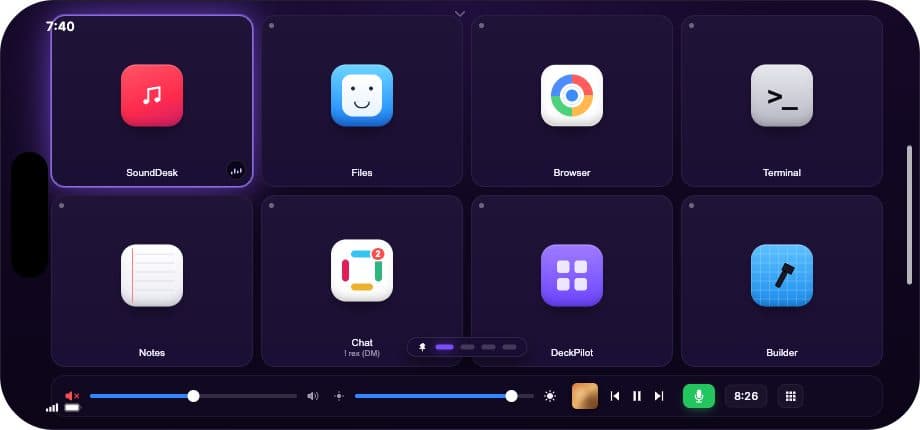
DeckPilot, the app we make, puts a grid on an iPhone or iPad and sends the tap to the Mac. A button can open an app or send a keyboard shortcut, and the connection is local Wi-Fi or a USB cable. The Mac needs macOS 14 or later, the device needs iOS or iPadOS 17 or later, and the build is on the download page.
When you still want a hardware pad
A glass screen asks you to look at the label before the tap can land. Buy a hardware pad for a key you can press without looking, or for a dial while you game, stream, or edit. Pads with those keys and dials are compared in the alternatives roundup.
How the four options compare
The split that matters is what the device is doing, and which way the control goes.
| Option | What it does | Which way control goes | Buttons you design | Good for |
|---|---|---|---|---|
| Sidecar | The iPad shows the Mac desktop, plus a sidebar and an optional Touch Bar | The Mac desktop is on the iPad | No | A modifier while you draw, or an app that still fills the Touch Bar |
| iPhone Mirroring | The iPhone appears in a window on the Mac | The Mac controls the iPhone | No | iPhone apps and notifications while you sit at the desk |
| Phone or tablet app | Labeled buttons trigger actions on the Mac | The phone or tablet controls the Mac | Yes | Shortcuts and launches you want to see and tap |
| Hardware pad | Physical keys, and sometimes dials | The pad controls the Mac | Yes | A press without looking, a dial, gaming, or streaming |
If you mostly need a modifier, or a control the front app already puts on the Touch Bar, Sidecar is enough. If you need a button you named, use a deck app on a device you already have.
Questions that come up
Can iPhone Mirroring control my Mac?
The window on the Mac controls the iPhone, including its apps and notifications. A click in that window does not run a shortcut or open an app on the Mac.
Can I add my own buttons to the Sidecar sidebar?
You get a fixed set of Mac controls in the sidebar, and the Touch Bar shows only what the frontmost app provides. Running a Shortcut, a script, or a URL takes a button app.
Can Sidecar and iPhone Mirroring run at the same time?
iPhone Mirroring stays unavailable while the Mac is using Sidecar or AirPlay. End the Sidecar or AirPlay session before you try to open the iPhone window.
Can a button app stay open on the iPad during Sidecar?
Opening another iPad app suspends Sidecar until you switch back to it. The buttons can live on an iPhone while the iPad stays the display.