
App decks / Warp
Warp Terminal shortcuts on your iPhone
Warp already lives on the keyboard. This official eight-button template is for the commands you still reach for with a chord: split, AI command, block jump, workflows, and clear.
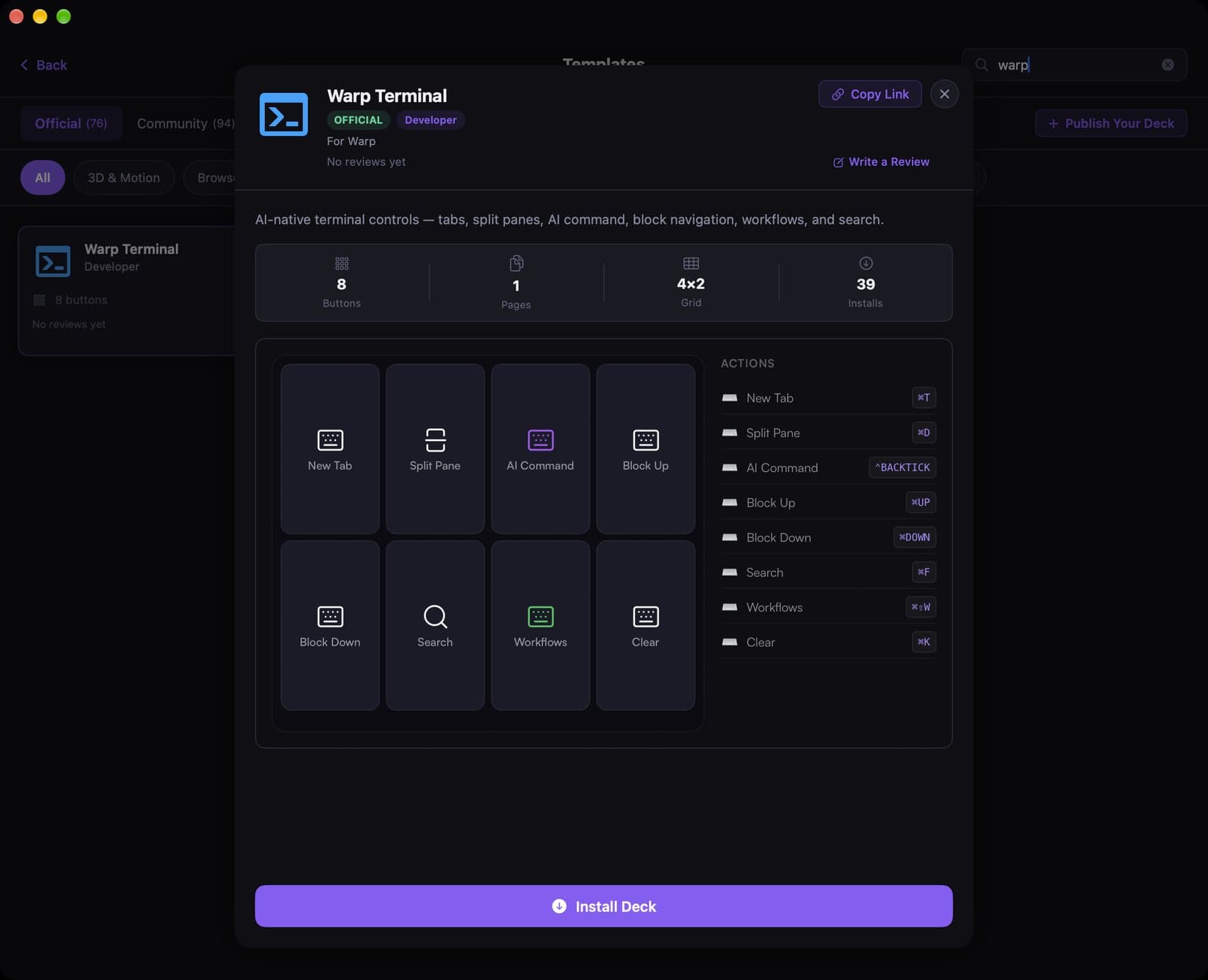
See the template
A 12-second recording of this pack in the live DeckPilot Mac app. It plays silently; use the controls if you want to pause or scrub.
The pack is one 4×2 page: New Tab, Split Pane, AI Command, Block Up, Block Down, Search, Workflows, and Clear.
There is no dedicated “run shell script” action in Discover. If you want a button that runs a command, use AppleScript with do shell script or a Shortcut — the shell-command guide walks through both. This template itself is shortcut-based, like the Terminal and iTerm2 packs.
What's on the deck
- New Tab⌘T
- Split Pane⌘D
- AI Command`
- Block Up / Down⌘↑ / ⌘↓
- Search⌘F
- Workflows⌘⇧W
- Clear⌘K
Related guides
- Stream Deck setups for software engineers
- Run a shell command from a button
- Set up keyboard shortcuts
- Create a deck for an app